Lead Capture
Website forms, landing pages, chat widgets, call tracking, and ad forms should feed contacts into the CRM correctly.
Virsa Labs Marketing » CRM Automation Cost for Small Businesses

Local SEO Services
SEO in Lehigh Valley
Local SEO in Lehigh Valley
Website Development
CRM Automation
Case Studies
Client Testimonials
Book a Strategy Review
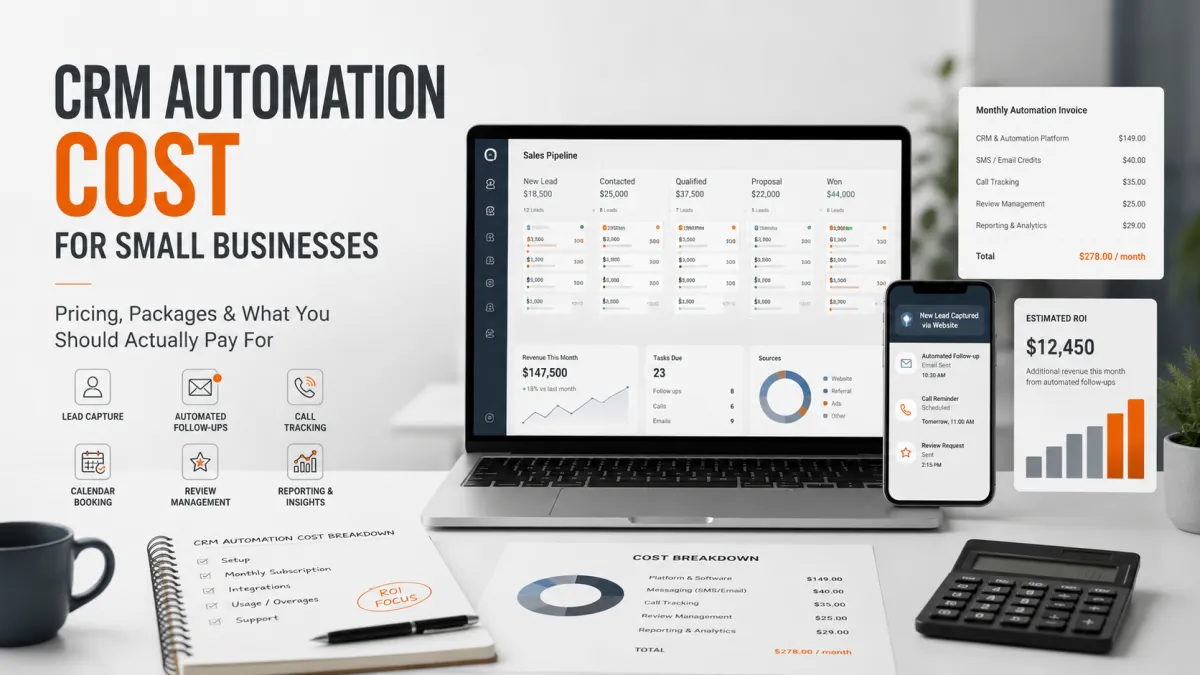
CRM automation for small businesses usually costs $300 to $2,500+ per month, depending on how much setup, customization, follow-up automation, pipeline tracking, review automation, missed-call recovery, and reporting you need. A simple CRM setup may cost a few hundred dollars per month. A serious lead conversion system with workflows, SMS/email follow-ups, call tracking, appointment reminders, review requests, pipeline management, and ongoing optimization can cost $750 to $2,500+ per month.
The real question is not “how much does CRM automation cost?” It is whether the system helps you convert more of the leads, calls, form fills, missed calls, estimates, and past customers you already have.
Key Takeways
Most small businesses should expect to pay $300 to $2,500+ per month for CRM automation, depending on whether they need a basic setup or a serious conversion system.
The biggest pricing factor is complexity: missed-call text back, lead follow-up, pipeline tracking, appointment reminders, review automation, and reporting all add value but require proper setup.
The cheapest CRM setup usually becomes expensive when nobody uses it, leads still fall through, and there is no ongoing optimization.
CRM automation makes the most sense when your business already gets calls, form fills, ad leads, estimate requests, repeat customers, or reviews that need better follow-up.
For most small businesses, CRM automation falls into three broad pricing levels: basic CRM setup, growth-focused automation, and full lead conversion systems. The right setup depends on how many leads your business gets, how complex your follow-up process is, and how much automation you need across calls, forms, appointments, reviews, and reporting.
| Service Level | Typical Cost | Best For | What’s Usually Included |
|---|---|---|---|
| Basic CRM Setup | $300–$750/month | Small businesses needing simple organization and light automation. | Contact import, basic pipeline setup, forms, simple email or SMS reminders, and calendar integration. |
| Lead Follow-Up Automation | $750–$1,500/month | Businesses getting calls, forms, ad leads, or estimate requests regularly. | Missed-call text back, appointment reminders, estimate follow-ups, lead nurture workflows, review requests, and pipeline tracking. |
| Full CRM Conversion System | $1,500–$2,500+/month | Businesses running ads, SEO, multiple services, or higher-ticket offers. | Advanced workflows, segmentation, reporting dashboards, sales pipeline automation, call tracking, reactivation campaigns, and optimization. |
| Custom CRM Buildout | $1,000–$7,500+ one-time | Businesses wanting a larger upfront implementation without full monthly management. | Pipeline architecture, workflow mapping, automations, templates, integrations, calendars, forms, and onboarding documentation. |
CRM automation pricing changes based on how much business logic, follow-up complexity, and operational tracking the system needs to handle. A basic contact database is simple. A system that tracks lead source, appointment status, estimate follow-up, review requests, and customer reactivation requires more planning and customization.
More lead channels require better tracking and routing. Website forms, Google Ads, Facebook Ads, calls, and referrals often need separate workflows.
Single-service businesses are easier to automate. Multi-service businesses need segmentation, tagging, and custom follow-up paths.
Basic autoresponders are simple to build. Advanced workflows based on lead stage and behavior require more strategy.
Fast-booking businesses need speed-to-lead automation. Higher-ticket services need longer nurture and reminder systems.
Costs increase when CRMs connect with calendars, websites, payment tools, or call tracking. Third-party integrations usually require additional setup.
Strong systems improve over time using real lead and booking data. Monthly workflow refinement often matters more than the original build.
Cheap CRM automation is usually software access plus a few basic templates. Serious CRM automation focuses on how the business actually handles leads, missed calls, appointments, estimates, reviews, and follow-up. The difference is not just software features. It is whether the workflows match the real sales process.
This is usually the fastest and least expensive way to get a CRM online, but it is often built around software features instead of the business process.
This approach is designed around real business situations: missed calls, form fills, quote follow-ups, repeat customers, and lead recovery.
A small business CRM automation system should include more than a contact list. It should capture leads correctly, move them through a real pipeline, follow up fast, reduce no-shows, recover quotes, request reviews, and help bring past customers back.
Website forms, landing pages, chat widgets, call tracking, and ad forms should feed contacts into the CRM correctly.
You should be able to see where each lead is: new lead, contacted, booked, estimate sent, won, lost, no-show, or completed.
New leads should get fast text or email follow-up, and missed calls should trigger an automatic text back.
Reminders help reduce no-shows and confusion for consultations, estimates, service calls, and booked appointments.
Automated quote reminders help recover leads that were interested but distracted before making a decision.
After a completed job or visit, the system should request a review at the right time to support trust and local visibility.
Past customers can be brought back with seasonal offers, maintenance reminders, checkups, and follow-up campaigns.
Owners should see lead sources, call volume, booked appointments, pipeline value, and where opportunities are being lost.
For some businesses, CRM automation should also connect to the website, ad campaigns, and tracking so marketing and sales stay aligned.
CRM automation is most valuable when your business already gets leads or customers but lacks consistent follow-up. It may not be the right investment yet if there is no lead flow, no clear offer, no sales process, or no one committed to using the system.
Before hiring a CRM automation provider, ask what they are actually building. The right provider should understand your sales process, follow-up flow, reporting needs, and how the CRM supports bookings, reviews, and revenue visibility.
The provider should explain exactly how the system responds to missed calls, whether it sends an automatic text back, and how the lead is routed for follow-up.
Different lead sources should be identifiable in the CRM so you can see what is producing real opportunities and what is not.
A strong CRM should segment leads by service, offer, or intent so follow-up messages are relevant instead of generic.
If your business books consultations, estimates, or service appointments, reminders should be part of the system to reduce no-shows and confusion.
Many businesses lose deals after the quote is sent, so the CRM should help with timely reminders and follow-up sequences.
Review automation matters for local trust and visibility, so the provider should explain how and when review requests are sent.
The messaging should sound natural and match your business, not feel robotic or overly generic.
CRM automation should improve over time, so ask how workflow testing, reporting, and updates will be handled after the build is live.
The biggest CRM mistakes usually come from treating software as the strategy. The real risks are weak workflows, poor follow-up logic, bad staff adoption, and no connection between the CRM and the business’s actual sales process.
Software alone does not create a working system. The workflow has to match how the business actually sells.
Too many texts and emails can feel robotic or annoying. Automation should move the customer forward, not overwhelm them.
If every lead enters the CRM the same way, you cannot compare sources clearly. SEO, ads, referrals, and website traffic should be tracked separately.
If the team does not understand the CRM, leads will still fall through. Training and workflow clarity are essential.
Reviews affect trust, conversion, and local visibility. The review process should connect to the broader local SEO strategy.
CRM automation should improve over time based on what leads actually do. One-time builds often leave value on the table.
Virsa Labs Marketing looks at CRM automation as part of a larger growth system, not just a backend tool. The goal is to help small businesses book more appointments, recover more missed opportunities, improve review flow, and get clearer visibility into where leads are coming from and where they are being lost.
That approach is shaped by work across dentists, medical practices, auto detailers, contractors, home service businesses, and other local service companies. A dental office does not follow up like an auto detailer, and a roofing company does not convert leads the same way a moving company does. The CRM has to match the actual business model.
For some clients, the priority is missed-call recovery. For others, it is ad lead follow-up, review generation, reactivation, or estimate follow-up. In more competitive markets, CRM automation supports a broader strategy that includes SEO, paid ads, landing pages, websites, and reporting.
Virsa Labs brings founder-led strategy from Harjot Dehal, 60+ 5-star Google reviews, Lehigh Valley local presence, national client work across the U.S., and experience across SEO, paid ads, websites, CRM automation, review systems, call tracking, and lead generation.
If your business is getting leads but losing track of follow-up, missed calls, quotes, reviews, or repeat customers, CRM automation is worth looking at.
Virsa Labs can help build a CRM automation system that connects your website, calls, forms, follow-ups, reviews, and reporting into one cleaner process.
Start with a practical review of where leads are currently coming from, where they are being lost, and what should happen automatically after each inquiry.
CRM automation usually costs $300 to $2,500+ per month for small businesses. Basic setups are on the lower end. More complete systems with missed-call text back, lead follow-up, appointment reminders, review automation, pipeline tracking, and reporting cost more.
It can be either. Some businesses pay a one-time setup fee of $1,000 to $7,500+ for the buildout, then pay a smaller monthly software or support fee. Others pay a monthly management fee that includes setup, hosting, workflow updates, reporting, and optimization.
The cheapest option is usually a basic CRM subscription with simple templates. This may cost under a few hundred dollars per month, but it often requires the business owner to build and manage the system. Cheap is fine if your process is simple and you have time to manage it.
A strong system should include lead capture, pipeline tracking, missed-call text back, automated follow-up, appointment reminders, quote follow-ups, review requests, reactivation campaigns, and reporting. The exact setup depends on your services, lead sources, and sales process.
CRM automation is worth it when your business gets leads, calls, bookings, estimates, or repeat customers that need better follow-up. If you recover even a few missed opportunities each month, the system can often justify itself.
Local service businesses, dentists, medical practices, auto detailers, contractors, roofers, remodelers, movers, med spas, and appointment-based businesses benefit heavily. Any business with inbound leads, missed calls, quotes, or repeat customers can benefit.
Yes. Missed-call text back is one of the most practical automations for small businesses. When someone calls and nobody answers, the system can automatically send a text so the lead does not immediately move on to a competitor.
Yes. Review automation can request reviews after completed jobs, appointments, or services. This is especially useful for local businesses because reviews affect trust, conversion, and Google Maps performance.
CRM software stores contacts and pipeline information. CRM automation creates actions based on triggers, such as sending follow-up texts, reminding customers, moving pipeline stages, requesting reviews, or notifying staff.
It depends on your current situation. If you already get leads but lose them due to slow follow-up, CRM automation should come first. If you do not have enough lead flow yet, SEO, paid ads, or lead generation may need to come first, with CRM automation added as volume increases.